
Grand Theft Auto V captivated players with its revolutionary mechanics, picturesque metropolis scenery, unique characters, and many other aspects. Despite its release in 2013, interest in the game remains undiminished. Its global audience reaches over 4.2 million daily.

While the game’s developers release regular updates, the gaming community also creates its own mods for GTA V. These modifications can improve graphics, add storylines, or completely transform the game.
In this article, we will explain the types of FiveM mods you can install and how to do so. You will learn how to play online with them without risking a ban and how ModsHub can help you improve your modding experience.
Why Players Enjoy Playing GTA 5 with Mods
GTA 5 modding has been popular since the earliest versions of the franchise. Initially, these were single-player modifications that added new cars or skins to the game without disrupting its original structure. However, the greatest popularity of mods is associated with GTA 5 role-playing games. For example, the FiveM modification has become so beloved by players that it can attract more players on the platform than the official versions of the game.
GTA 5 mods allow players to maintain constant interest and personalize the storyline, add new characters, improve visuals, and more. For example, the GTA 5 game world was modeled after Los Angeles by stylizing and compressing the city map. However, mods allow you to transform the Los Santos environment to the point that it realistically conveys the views of Los Angeles.
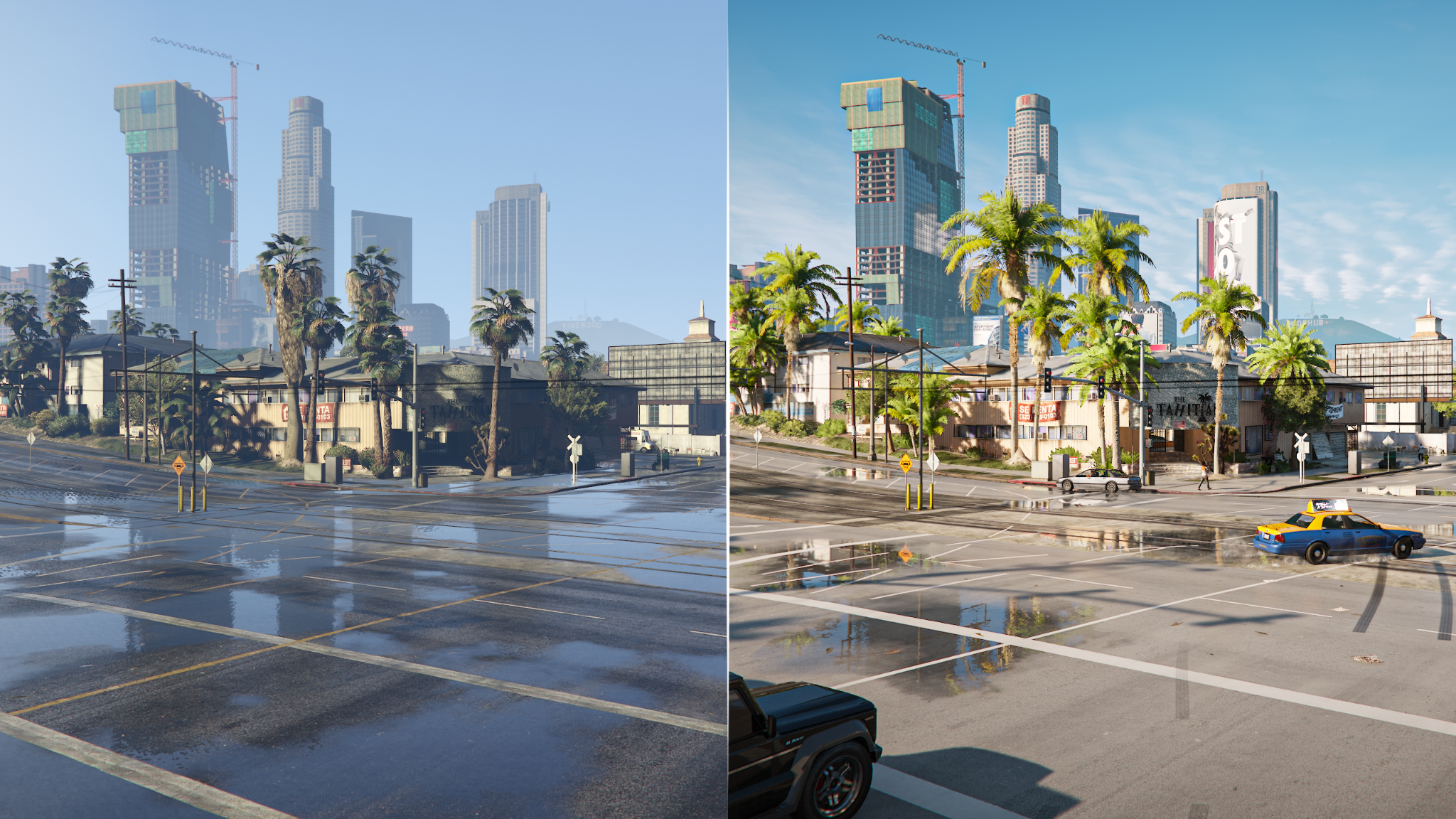
How You Can Improve GTA 5 with Mods for PC
There are hundreds of thousands of GTA 5 mods, from small scripts to role-playing servers. However, this wide variety of modifications can be categorized into 7 key categories:
- Vehicle Mods: You can add real-world brands of cars, motorcycles, helicopters, and other vehicles to the game. You can also integrate fantasy or iconic cars into your game, such as those from movies or anime.
- New Mechanics: Players can improve gameplay with script mods. For example, you can change the weather, add new professions, make characters immortal, etc.
- Adding/Replacing Characters: You can change the appearance of existing characters and give them superpowers. Alternatively, add superheroes from other games or celebrities to GTA 5.
- City Map Modifications: Expand the city map and surrounding areas by adding new buildings and even territories. They can become not only part of the landscape but also the gameplay space you enter to perform actions.
- Sound Effects: Make sounds more realistic with mods. This category may include engine sounds, gunshots, sirens, crowd noise, rain, and more.
- Story Missions: You can add separate, full-fledged storylines or expand existing ones.
- Interface Modifications: Mods allow you to transform the game’s appearance by styling, editing, and removing interface elements.

Step-by-step Installation of GTA 5 Mods on a Windows PC
Before installing mods, you need to understand the fundamental difference between file and script mods. This distinction affects not only what you get but also how you install them:
- File mods change the visual and sound experience of the game while leaving the gameplay logic intact. For example, you can improve graphics, change road textures, make gunfire sounds more realistic, etc. To install these mods, you will need to modify the original game archives or install a separate folder.
- Script mods change the gameplay logic, add new functionality, characters, etc. You don’t need to modify the main game archives for these mods.
A Detailed Guide to Installing File Mods with the .OIV Extension
To edit and install file-based GTA 5 mods, you will need the OpenIV program. It works with files that have the .oiv extension.
- Download the archive of mods you want to add to the game and unzip it into a separate folder.
- Download the OpenIV program from the official website, install it, and open it.
- Open the Tools menu and select “Package Installer.” The program will prompt you to select a file to install.
- Click the “Browse” button to access your downloaded mods.
- Select the desired .oiv file and click the Install button.
- Once the installation is complete, you can start the modified game.
If the downloaded mods don’t include a file with the .oiv extension, OpenIV won’t help. In this case, you will need to install the mods manually, creating a separate “mods” folder. This approach allows you to avoid reinstalling the game if the mods don’t work as expected.
The Best Way to Install GTA 5 Mods with the “mods” Folder
If you want to back up your base game files, you should install mods in a separate folder. In this case, you also need OpenIV, so download and install it before you start modding GTA 5.
- Open the game’s root directory and create a separate folder named “Mods.”
- Select the game archives you want to modify and copy them to this new folder.
- Launch OpenIV and select GTA V for Windows.
- Activate “Edit Mode” to start modifying the vanilla version of the game.
- Protect the official game files by restricting modification to files in the “Mods” folder only. To do this, go to General Settings in the Tools menu and select “mods” only.
- You can begin modifying all game elements, including sounds, graphics, characters, and more.
- After making all your changes, save your edits using the “Save” button in OpenIV.
- Activate “ASI Manager” in the Tools menu and install it using ASI Loader.
- Launch GTA V and check how your modifications have changed the game.
Installing Script Mods for GTA 5
To install script mods, you will need the Script Hook V base library, ASI Loader, and the Community Script Hook V .NET plugin.
- Unzip Script Hook V to the game’s root folder.
- Create a “Scripts” folder in the GTA V root directory.
- Download the script mods to your PC and unzip them to this folder.
- Add the Script Hook V .NET files to the root directory.
- Launch the game, which will already be modified by your mods.
You may also encounter GTA 5 mods that require manual installation. However, they come with detailed instructions on how to do this.
Before you begin modding GTA 5 using any of these methods, make a backup copy of the game. This will protect your vanilla version, which may not respond well to mods. Some mods modify the original GTA V files, causing crashes. If this happens, you will have an untouched backup version of the game.

Important Note Before Playing GTA 5 Mods Online
If you want to play GTA 5 online with mods, it could result in a ban, including a permanent one. When you connect to servers, the anti-cheat system scans the game files. If it detects modified files or new folders, it will consider them a threat. Therefore, to play GTA 5 online, you will need clean copies of the files.
Still, you can play with mods on the FiveM platform without any risk of being banned. To do this, use the ModsHub app. Download GTA 5 mods from our library in one click for a safe and fast modding experience. This is a better option than expensive developer mods and unsafe open-source mods.
Reasons to Try ModsHub Instead of Manual Installation
We’ve collected hundreds of the best GTA 5 mods that you can download from our library. Installing FiveM mods via ModsHub is incredibly simple, allowing you to create a dynamic, creative playground without any prior experience. Follow these steps to enjoy custom environments, new mechanics, story branches, and other wonderful transformations:
- Download the latest version of the ModsHub app from the official website, ModsHub.io.
- Log in to the app using your Discord account.
- Show the path to your GTA 5 and ModsHub folders for installing mods.
- Browse our library to find mods that match your preferences.
- Click the “Install” button next to any mod you want to add to your game.
All mods will be automatically added to your GTA 5, greatly simplifying the modding process. This method of adding mods is safe, effortless, and accessible even to beginners. Using the ModsHub app, you get the following benefits:
- Time Saving: ModsHub’s extensive mod library and intuitive interface make installing GTA 5 mods very simple. You won’t have to navigate numerous websites looking for mods and figure out how to install each one individually.
- A wide variety of mods: The ModsHub library includes all types of mods you can use to enhance your gameplay. Here, you’ll find sound mods, graphics mods, scripts, and much more. Experimenting with them will give you a truly rich gaming experience.
- Reliability: All mods offered in the app have been tested. This eliminates the risk of downloaded mods causing game crashes or simply not working.
- Safety: All mods are checked for various security threats before being added to the library. This ensures your computer is free of viruses or malware.
Troubleshooting: “File Not Found”
When installing mods via ModsHub, you may encounter a page that shows “File Not Found.” This can occur due to outdated or mistyped links. There are several ways to resolve this problem:
- Use the mod’s name to find the file you need on ModsHub.io manually.
- Open the mod’s category to find it among others. For example, these could be Vehicles, Weapon Skins, and so on.
- Check the mod creator’s profile to see if the mod has been reuploaded or has a different name.
- Try clearing the cache using the keyboard shortcut Ctrl+F5.
One of these methods is likely to work and help you find the mod you need. The only exceptions are mods that are currently under maintenance. In this case, you’ll need to check back later when the mod becomes available again.
Stay tuned to the ModsHub Discord for updates! Get instant access to the best GTA 5 mods and customize your game with ModsHub! Experience limitless creative freedom and fill your game with fresh experiences!
 There is a specific skill involved in explaining something clearly — one that is completely separate from actually knowing the subject. Terry Colemoniero has both. They has spent years working with multiplayer strategy breakdowns in a hands-on capacity, and an equal amount of time figuring out how to translate that experience into writing that people with different backgrounds can actually absorb and use.
Terry tends to approach complex subjects — Multiplayer Strategy Breakdowns, Gaming Setup Optimization Tips, Pro Tips Collection being good examples — by starting with what the reader already knows, then building outward from there rather than dropping them in the deep end. It sounds like a small thing. In practice it makes a significant difference in whether someone finishes the article or abandons it halfway through. They is also good at knowing when to stop — a surprisingly underrated skill. Some writers bury useful information under so many caveats and qualifications that the point disappears. Terry knows where the point is and gets there without too many detours.
The practical effect of all this is that people who read Terry's work tend to come away actually capable of doing something with it. Not just vaguely informed — actually capable. For a writer working in multiplayer strategy breakdowns, that is probably the best possible outcome, and it's the standard Terry holds they's own work to.
There is a specific skill involved in explaining something clearly — one that is completely separate from actually knowing the subject. Terry Colemoniero has both. They has spent years working with multiplayer strategy breakdowns in a hands-on capacity, and an equal amount of time figuring out how to translate that experience into writing that people with different backgrounds can actually absorb and use.
Terry tends to approach complex subjects — Multiplayer Strategy Breakdowns, Gaming Setup Optimization Tips, Pro Tips Collection being good examples — by starting with what the reader already knows, then building outward from there rather than dropping them in the deep end. It sounds like a small thing. In practice it makes a significant difference in whether someone finishes the article or abandons it halfway through. They is also good at knowing when to stop — a surprisingly underrated skill. Some writers bury useful information under so many caveats and qualifications that the point disappears. Terry knows where the point is and gets there without too many detours.
The practical effect of all this is that people who read Terry's work tend to come away actually capable of doing something with it. Not just vaguely informed — actually capable. For a writer working in multiplayer strategy breakdowns, that is probably the best possible outcome, and it's the standard Terry holds they's own work to.