

If you’re looking to level up your performance, comfort, and overall immersion, you’re in the right place. This guide is built for gamers who want practical, results-driven advice on gaming desk setup optimization—not vague tips or recycled forum chatter. Whether you’re fine-tuning a competitive multiplayer station or upgrading a casual console corner, your setup directly impacts reaction time, endurance, and consistency.
We break down what actually matters: desk height and positioning, monitor alignment, lighting control, cable management, controller placement, and stick sensitivity considerations. Every recommendation is grounded in real-world gaming scenarios, performance ergonomics, and hands-on testing of modern console and PC environments.
Instead of guesswork, you’ll get clear, actionable steps to reduce strain, improve precision, and create a cleaner, more efficient battlestation. By the end, you’ll know exactly how to transform your current space into a setup that supports longer sessions, sharper gameplay, and a more immersive experience.
Ergonomics: The Foundation of Gaming Endurance
If you want longer sessions without the mid-match slump, start with the 90-Degree Rule. Feet flat on the floor. Knees at a 90-degree angle. Elbows bent at 90 degrees, level with your desk. This alignment keeps your joints stacked and your muscles neutral (translation: less strain, more stamina). It sounds simple, but most players skip it—and pay for it after hour two.
Here’s the right order: adjust your chair FIRST. Lock in proper leg posture. Then raise or lower your desk to match. Adjustable-height desks give you flexibility for different games and peripherals, making gaming desk setup optimization far more precise. Pro tip: if your feet dangle, use a footrest—don’t compensate with bad posture.
Wrist and arm health is where many setups fail. Keep wrists straight, not bent upward or sideways. Armrests should lightly support your forearms without lifting your shoulders. For keyboard and mouse players, this reduces repetitive strain. For controller or stick players, it stabilizes micro-movements and improves accuracy.
• ALIGNMENT OVER AESTHETICS
• SUPPORT WITHOUT TENSION
Some argue discomfort is “part of the grind.” But fatigue isn’t toughness—it’s lost reaction time. Proper ergonomics delays physical burnout, keeping focus sharp deep into overtime (because the only thing that should drop late-game is your opponent’s HP).
Monitor Positioning for Millisecond Advantages
Monitor positioning isn’t just about comfort—it’s about performance. Start with eye level. The top bezel (the outer frame of your screen) should sit at or slightly below eye level. This keeps your neck neutral and reduces strain, which research from OSHA links to improved focus and reduced fatigue during long sessions. In other words, fewer aches, more wins.
Some players argue that monitor height is personal preference. Fair. But when your chin tilts up or down for hours, micro-distractions add up (and distractions lose matches). Keeping your primary field of view centered means faster target acquisition—those split-second flicks feel more natural because your eyes aren’t constantly readjusting.
Next, follow the arm’s length rule. For 24–27 inch monitors, sit about 20–30 inches away. This distance maximizes peripheral vision without forcing your eyes to refocus repeatedly. The benefit? You spot flankers sooner and track motion more smoothly—think less tunnel vision, more “spider-sense.”
Then adjust angle and glare. Tilt the monitor slightly upward and position it perpendicular to windows or lights. Glare reduces contrast sensitivity, which can delay visual processing (American Optometric Association). Pro tip: bias lighting behind the screen softens harsh contrast.
Dial this in once, and your gaming desk setup optimization pays dividends every match.
Mastering Your Input Zone
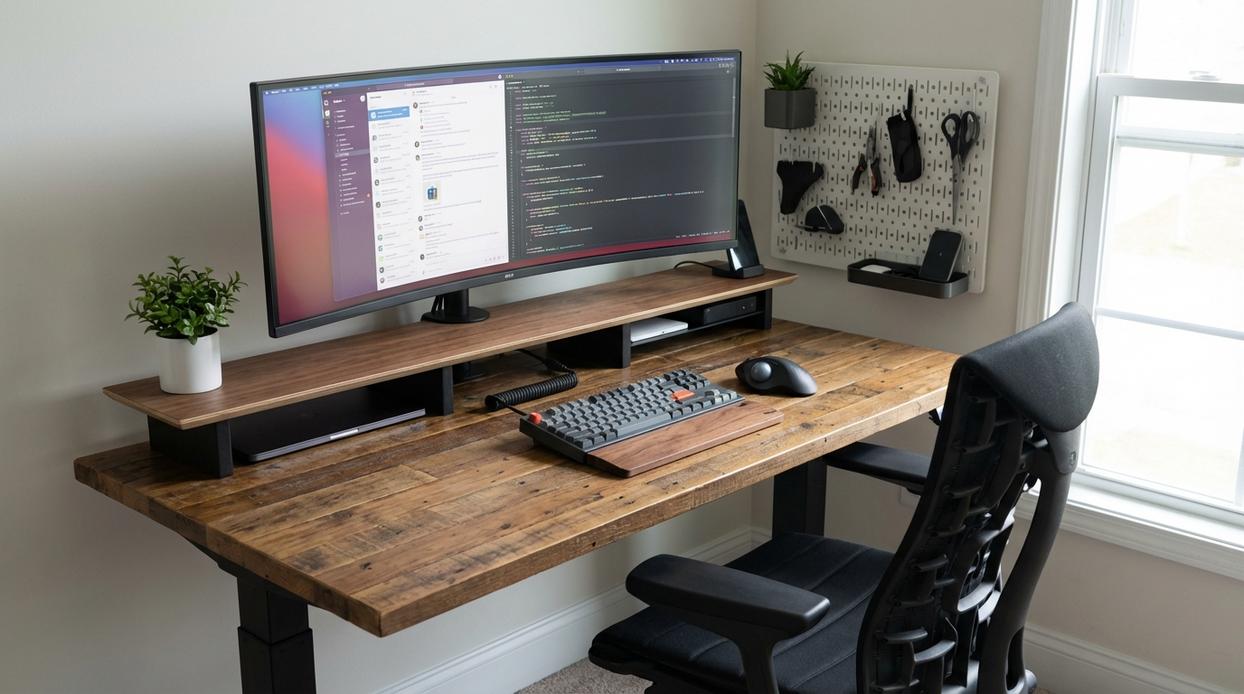
I learned this the hard way during a sweaty ranked FPS grind: I kept lowering my DPI for precision, but my crosshair felt “stuck.” The real problem? I was running out of mousepad.
Mouse Real Estate
Low-DPI aiming (typically 400–800 DPI) means wider arm movements for accuracy. Low DPI simply means your cursor moves fewer pixels per inch of physical mouse travel. Many competitive players prefer it for smoother tracking (common in titles like CS2 and Valorant). But it demands space—think at least 45–50 cm of horizontal glide. A large, clean mousepad can be the single biggest upgrade for FPS players (yes, bigger than that flashy RGB mouse).
Pro tip: Wash cloth pads monthly; dirt increases friction and micro-stutter.
Keyboard Placement
I used to keep my keyboard straight. My wrist hated me. Angling it 15–30 degrees freed up mouse space and reduced ulnar deviation (that outward wrist bend that causes strain).
Straight placement:
- Familiar typing feel
- Balanced desk symmetry
Angled placement:
- More mouse room
- More natural shoulder alignment
Some argue angled boards look awkward or disrupt muscle memory. Fair—but comfort over aesthetics wins long-term.
Stick and Controller Stability
Stick-based controller players have a different battle. Arcade sticks amplify vibration during intense inputs. A stable, vibration-free surface is essential. Non-slip mats or desk clamps prevent mid-match drift (nothing tilts you faster than your controller sliding during a combo).
Surface Material Matters
Wood grips well. Laminate can slide. Glass? Beautiful—but slippery. Add rubber desk mats or adhesive grip pads to stabilize gear. These small tweaks are foundational to gaming desk setup optimization.
And remember, even the best hardware underperforms without tuning—pair this with “reducing input lag monitor and display settings explained” for a complete input overhaul.
Eliminate Chaos: Cable Management and Focus
First, let’s define clutter load—the mental strain caused by visual mess competing for your attention. In high-stakes gaming, where milliseconds matter, that strain chips away at reaction time and decision-making (Princeton Neuroscience Institute found clutter reduces focus and processing efficiency). In other words, your messy desk isn’t just ugly—it’s nerfing you.
Meanwhile, clean cables aren’t about aesthetics alone. Think of it like Tony Stark’s lab: everything intentional, nothing accidental. Start simple. Use cable sleeves to bundle wires into one streamlined path. Add an under-desk tray to lift power strips off the floor. Finish with reusable Velcro ties for adjustable tension (pro tip: label both ends to save future headaches).
More importantly, proper routing prevents mouse drag or controller snags at critical moments. No sudden resistance mid-flick. No “why did I lose that?” excuses.
Ultimately, gaming desk setup optimization isn’t a chore. It’s a competitive edge—a clean slate that lets you focus purely on the win.
Level Up Your Setup and Your Skill
You came here to figure out how to improve your gameplay through smarter gear choices, smarter layouts, and better stick control. Now you understand how console trends, multiplayer strategy, and precise controller mechanics all connect back to one critical factor: your environment.
If your reactions feel slow, your hands cramp mid-match, or your aim lacks consistency, the real issue may not be skill — it’s setup. Dialing in your gaming desk setup optimization can eliminate distractions, improve comfort, and give you the competitive edge you’ve been missing.
The next move is simple: audit your current setup today. Adjust your monitor height, fine-tune controller sensitivity, improve cable management, and test different positioning for peak comfort and control. Small changes create massive performance gains.
Thousands of competitive players are already upgrading their setups and seeing faster reactions, better accuracy, and longer, more comfortable sessions. Don’t let a poorly optimized space hold you back.
Take action now — refine your setup, apply what you’ve learned, and turn every session into a winning advantage.
 Ask Donald Symondslaber how they got into console gaming trends and insights and you'll probably get a longer answer than you expected. The short version: Donald started doing it, got genuinely hooked, and at some point realized they had accumulated enough hard-won knowledge that it would be a waste not to share it. So they started writing.
What makes Donald worth reading is that they skips the obvious stuff. Nobody needs another surface-level take on Console Gaming Trends and Insights, Pro Tips Collection, Multiplayer Strategy Breakdowns. What readers actually want is the nuance — the part that only becomes clear after you've made a few mistakes and figured out why. That's the territory Donald operates in. The writing is direct, occasionally blunt, and always built around what's actually true rather than what sounds good in an article. They has little patience for filler, which means they's pieces tend to be denser with real information than the average post on the same subject.
Donald doesn't write to impress anyone. They writes because they has things to say that they genuinely thinks people should hear. That motivation — basic as it sounds — produces something noticeably different from content written for clicks or word count. Readers pick up on it. The comments on Donald's work tend to reflect that.
Ask Donald Symondslaber how they got into console gaming trends and insights and you'll probably get a longer answer than you expected. The short version: Donald started doing it, got genuinely hooked, and at some point realized they had accumulated enough hard-won knowledge that it would be a waste not to share it. So they started writing.
What makes Donald worth reading is that they skips the obvious stuff. Nobody needs another surface-level take on Console Gaming Trends and Insights, Pro Tips Collection, Multiplayer Strategy Breakdowns. What readers actually want is the nuance — the part that only becomes clear after you've made a few mistakes and figured out why. That's the territory Donald operates in. The writing is direct, occasionally blunt, and always built around what's actually true rather than what sounds good in an article. They has little patience for filler, which means they's pieces tend to be denser with real information than the average post on the same subject.
Donald doesn't write to impress anyone. They writes because they has things to say that they genuinely thinks people should hear. That motivation — basic as it sounds — produces something noticeably different from content written for clicks or word count. Readers pick up on it. The comments on Donald's work tend to reflect that.